WhatsApp Fonts Copy and Paste: 150+ Stylish Bio & Chat Fonts
Use our free WhatsApp fonts copy and paste guide to write in 150+ cursive, bold sans, gothic, bubble, and aesthetic Unicode styles on iPhone, Android, and WhatsApp Web without any app.
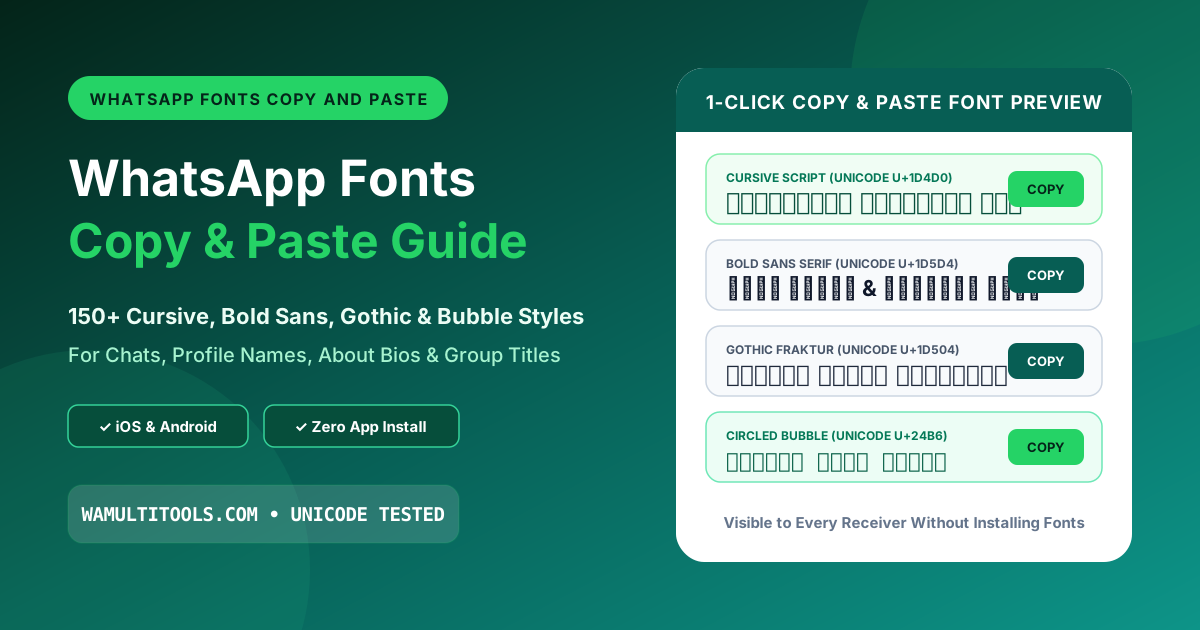
Why WhatsApp Built-In Shortcuts Do Not Work Everywhere
If you have ever tried putting asterisks around your name inside your WhatsApp profile settings (like typing *Ayesha* or *Admin*) hoping it would turn bold, you already know what happens. WhatsApp leaves the raw asterisks sitting right there next to your name. The exact same thing happens when you try to italicize a group chat subject line or add monospace backticks to your contact card.
That happens because WhatsApp's built-in punctuation symbols only work inside regular chat bubbles and status captions. They are completely turned off inside your Profile Name field, your Group Subject header, and your broadcast list titles.
When you use whatsapp fonts copy and paste styles from a browser generator, you are not relying on WhatsApp's punctuation parser at all. Instead, you are copying real Unicode alphabet characters that already look cursive, bold, gothic, or boxed on their own. Because every phone operating system treats those characters as regular letters rather than formatting code, you can paste them into your profile name, group header, About bio, or daily chat messages without installing any third-party keyboard app.
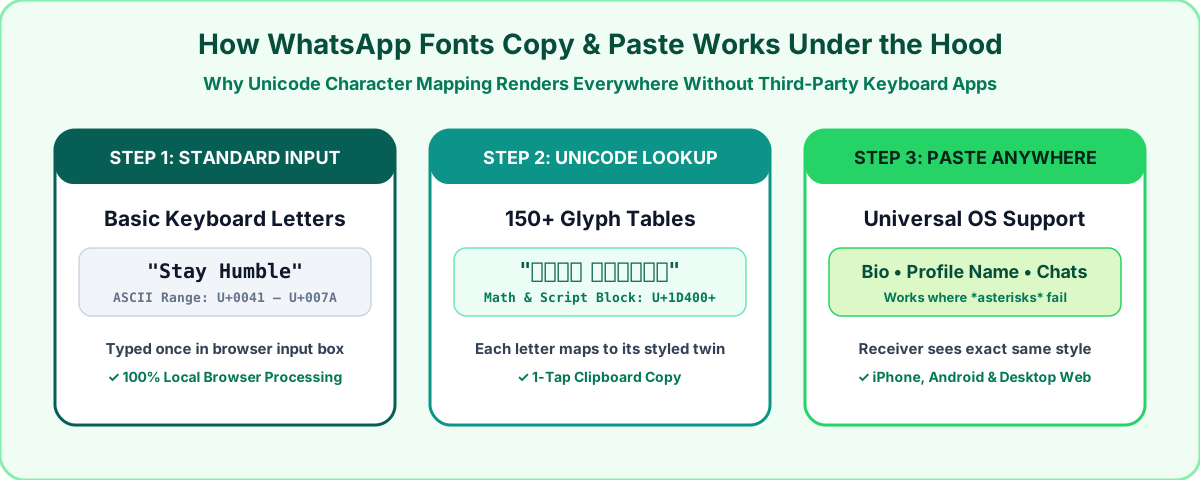
How Copy and Paste WhatsApp Fonts Work on Your Friend's Phone
Before changing a profile bio or sending an invitation in a family group, almost everyone asks the same question: if I paste a cursive or gothic font into WhatsApp, will the other person actually see that font, or do they need a special app installed on their phone?
They will see the exact same font you sent, even on a brand-new iPhone or Android phone with zero extra apps installed.
Back in the early days of Android phones, changing your system font inside display settings only changed how letters looked on your own screen. If you took a screenshot, your screen looked cursive, but the actual text message leaving your phone was still plain standard letters.
Modern whatsapp fonts copy and paste tools solve that by using the international Unicode standard. Every iPhone, Samsung, Xiaomi, Google Pixel, Windows PC, and Mac comes pre-loaded with a master character dictionary containing more than 140,000 symbols. Tucked inside that dictionary (mainly between code points U+1D400 and U+1D7FF, plus enclosed alphanumerics around U+24B6) are complete English alphabets originally added for mathematicians, physicists, and typesetters:
- Script and calligraphy alphabets (both regular weight and bold weight)
- Sans-serif bold and bold-italic alphabets that look thicker than normal WhatsApp text
- Fraktur and medieval gothic alphabets used in gaming names and clan tags
- Double-struck blackboard letters with hollow open strokes
- Circled bubble letters and squared block letters for badges and initials
When you type a normal word like Hello into our free WhatsApp Font Generator, your browser swaps each standard keyboard letter for its matching Unicode twin (turning Hello into 𝓗𝓮𝓵𝓵𝓸 or 𝗛𝗲𝗹𝗹𝗼). When your friend receives the message, their phone reads those Unicode ID numbers and draws the styled letters automatically.
Step by Step: How to Copy and Paste Fonts into WhatsApp
You do not need to download a keyboard app from the Play Store or App Store, and you never have to give an outside app permission to read what you type. Here is the fastest way to convert your text right inside your browser:
- Open our free WhatsApp Font Generator on your mobile phone or computer browser.
- Type or paste your sentence, bio quote, or group title into the main text box at the top of the screen.
- As you type, the page converts your words live across more than 150 styles sorted into clear tabs (Cursive, Bold Sans, Gothic, Bubble, Square, and Aesthetic).
- Tap the green Copy button next to the style that fits your message best.
- Open WhatsApp, tap and hold inside your chat bar, About status, or Profile Name field, and tap Paste.
If you want to learn more about why browser tools are safer than downloadable font keyboards, check out our detailed guide on How to Change Font Style in WhatsApp Without Any App.
Top 10 WhatsApp Fonts Copy and Paste Styles (Ready to Use)
Last week we tested all of our font families across four different screens: an iPhone 15 running iOS 18, a Samsung Galaxy S23 on Android 14, an older Redmi Note phone, and WhatsApp Web on a desktop monitor. Some decorative fonts look great as a two-word bio but become tiring to read if you use them for a ten-line paragraph.
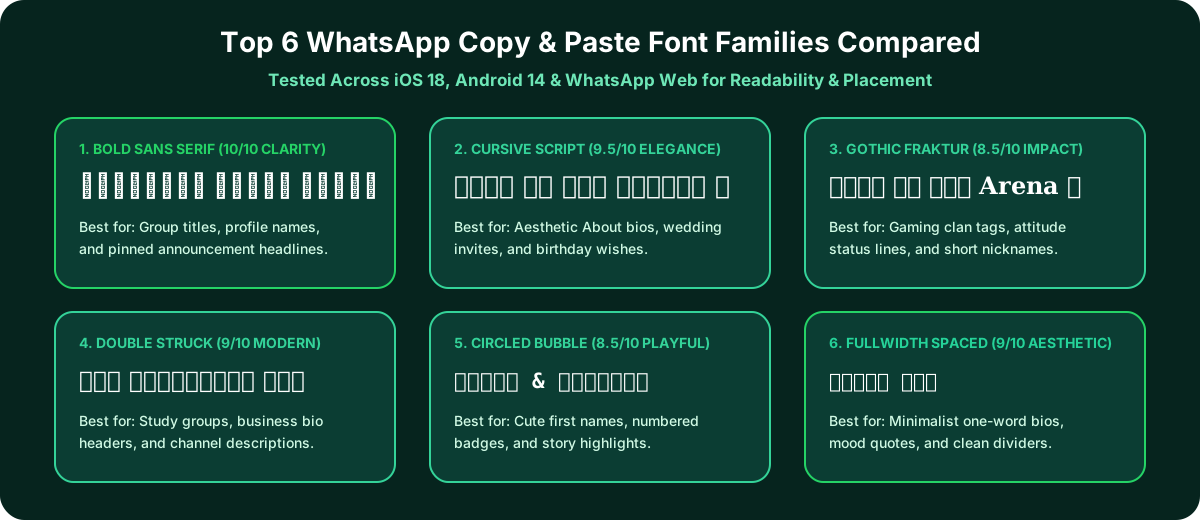
Here is how the ten most reliable copy-and-paste styles performed in our hands-on readability tests, along with live samples you can copy right from this table:
| Font Style Name | Live Copy & Paste Sample | Best Place to Use It on WhatsApp | Mobile Readability Score |
|---|---|---|---|
| Bold Sans Serif | 𝗪𝗵𝗮𝘁𝘀𝗔𝗽𝗽 𝗙𝗼𝗻𝘁𝘀 | Group subject names, pinned rules, and business headers | 10/10 (Crisp on every phone) |
| Bold Italic Sans | 𝙒𝙝𝙖𝙩𝙨𝘼𝙥𝙥 𝙁𝙤𝙣𝙩𝙨 | Highlighting dates, prices, or urgent notes in long chats | 10/10 (Stands out immediately) |
| Bold Cursive Script | 𝓜𝔂 𝓦𝓱𝓪𝓽𝓼𝓐𝓹𝓹 𝓑𝓲𝓸 | Aesthetic About bios, wedding invites, and birthday wishes | 9.5/10 (Smooth & dark strokes) |
| Fine Light Script | 𝒲𝒽𝒶𝓉𝓈𝒜𝓅𝓅 𝐹𝑜𝓃𝓉𝓈 | Poetry lines, soft mood quotes, and one-line captions | 8.5/10 (Best for short phrases) |
| Double Struck | 𝕎𝕙𝕒𝕥𝕤𝔸𝕡𝕡 𝔽𝕠𝕟𝕥𝕤 | Study group titles, club announcements, and channel names | 9/10 (Clean modern geometry) |
| Gothic Fraktur | 𝔚𝔥𝔞𝔱𝔰𝔄𝔭𝔭 𝔉𝔬𝔫𝔱𝔰 | Gaming clan tags, attitude bios, and short nicknames | 8/10 (Use for 1 to 4 words) |
| Bold Gothic Royal | 𝖂𝖍𝖆𝖙𝖘𝕬𝖕𝖕 𝕱𝖔𝖓𝖙𝖘 | Squad leader names and sports fan group headers | 8.5/10 (Thicker than regular gothic) |
| Circled Bubble | ⓌⓗⓐⓣⓢⒶⓟⓟ Ⓕⓞⓝⓣⓢ | Numbered list badges, initials, and cute contact names | 8.5/10 (Great for short labels) |
| Squared Block | 🅦🅗🅐🅣🅢🅐🅟🅟 🅕🅞🅝🅣🅢 | Short 3-to-5 letter words like NEW, VIP, SALE, or LIVE | 9/10 (High contrast blocks) |
| Fullwidth Spaced | WhatsApp Fonts | Minimalist one-word About lines and section dividers | 9/10 (Wide retro spacing) |
Four Places Where Copy and Paste Fonts Make the Biggest Difference
1. Making Your WhatsApp About Bio Stand Out
Most people leave their WhatsApp About line on the default "Available" or "Hey there! I am using WhatsApp." Swapping that out for a short cursive or spaced-out line immediately gives your profile personality. If you want to center your bio text in the middle of the screen, you can copy a few invisible Braille characters from our Blank WhatsApp Status tool and paste them right before your quote so WhatsApp does not delete the leading spaces. For ready-made bio lines, browse our collection of 150+ Stylish WhatsApp Bio Fonts & Attitude Lines.
2. Organizing Busy Group Titles and Pinned Announcements
When someone scrolls through forty chats on their phone screen, every group title looks identical. If you manage a family group, a university class group, or a customer broadcast list, changing the group name to Bold Sans (such as 📢 𝗖𝗹𝗮𝘀𝘀 𝗼𝗳 𝟮𝟬𝟮𝟲 𝗨𝗽𝗱𝗮𝘁𝗲𝘀) makes the chat much easier to spot in a crowded inbox.
3. Designing Gaming Nicknames and Clan Tags
If you play BGMI, Free Fire, Call of Duty Mobile, or EA FC with friends on WhatsApp, plain text names look ordinary in tournament brackets. You can combine gothic or small-caps letters with crown, sword, and wing symbols inside our Stylish Nickname Generator to build a custom tag that works both in your game profile and in your WhatsApp display name.
4. Formatting Long Status Updates and Event Invitations
When posting a long announcement or festival greeting across multiple WhatsApp Status slides, pairing a bold Unicode headline with our WhatsApp Status Splitter keeps your sentences from getting cut off mid-word at the 700-character limit. And if you want to turn a short word like HBD or WIN into giant block letters made entirely of fire or heart emojis, try our Text to Emoji Generator.
Crucial Tips We Learned Testing Unicode Fonts in Real Chats
After testing whatsapp fonts copy and paste styles across dozens of real group chats and business accounts, we found three practical habits that will save you from common formatting mistakes:
1. Keep Searchable Words in Plain Text
This is the single most useful detail to know about Unicode fonts. WhatsApp's built-in chat search bar looks for standard keyboard letters. If you send a client a street address, a bank reference, or a meeting password written entirely in Cursive Script (like 𝓜𝓪𝓲𝓷 𝓢𝓽𝓻𝓮𝓮𝓽), and two months later you type "Main Street" into the WhatsApp search box, the search bar will not find that message. To your phone's search index, a mathematical script letter and a regular keyboard letter are two completely different characters.
The smart approach is to use copy-and-paste fonts for your top headline, your greeting, or your bio, while keeping searchable names, dates, and addresses in standard letters (or using WhatsApp's native asterisk shortcuts, which we cover in our Complete Guide to WhatsApp Text Formatting Shortcuts).
2. Avoid Typing Whole Sentences in All-Caps Script or Gothic
Capital letters in Cursive Script (𝓐𝓑𝓒𝓓𝓔) and Gothic Fraktur (𝔄𝔅ℭ𝔇𝔈) have wide loops and flourishes designed for the first letter of a word. If you write a whole word in all-caps cursive (like 𝓦𝓔𝓛𝓒𝓞𝓜𝓔), the loops tangle together and become hard to read on a small phone screen. Always use normal Title Case (𝓦𝓮𝓵𝓬𝓸𝓶𝓮) when using script or gothic fonts.
3. Frame Important Group Rules Inside ASCII Boxes
When you want a pinned message or welcome note to look like a clean card inside a group chat, pair a Bold Sans title with a mobile-width border from our ASCII Art Text Generator:
╔══════════════════════╗
   ✨ 𝗚𝗥𝗢𝗨𝗣 𝗥𝗨𝗟𝗘𝗦 ✨
╚══════════════════════╝
Because our ASCII generator keeps every box under 28 characters wide and wraps the border in monospace backticks, the corners line up cleanly on both iPhone and Android screens.
15 Ready-to-Copy WhatsApp Font Lines for Your Bio and Chats
If you want to grab a styled line right away without typing from scratch, you can copy any of these tested lines directly into your WhatsApp About bio, status caption, or group description:
Aesthetic and Minimalist Bio Lines
- ✨ 𝒞𝑜𝓁𝓁𝑒𝒸𝓉𝒾𝓃𝑔 𝓂𝑜𝓂𝑒𝓃𝓉𝓈, 𝓃𝑜𝓉 𝓉𝒽𝒾𝓃𝑔𝓈 ✨
- 🌿 𝒫𝑒𝒶𝒸𝑒 𝑜𝒻 𝓂𝒾𝓃𝒹 𝑜𝓋𝑒𝓇 𝑒𝓋𝑒𝓇𝓎𝓉𝒽𝒾𝓃𝑔 🌿
- 🌙 𝐿𝒾𝓋𝒾𝓃𝑔 𝓁𝒾𝒻𝑒 𝒶𝓉 𝓂𝓎 𝑜𝓌𝓃 𝓅𝒶𝒸𝑒
- ☕ Fueled by 𝒸𝑜𝒻𝒻𝑒𝑒 and quiet mornings
- 🌊 Stay humble • Hustle hard
Bold Business and Group Admin Headers
- 📌 𝗢𝗳𝗳𝗶𝗰𝗶𝗮𝗹 𝗔𝗻𝗻𝗼𝘂𝗻𝗰𝗲𝗺𝗲𝗻𝘁𝘀 & 𝗨𝗽𝗱𝗮𝘁𝗲𝘀
- 🛍️ DM to Order • Fast Nationwide Delivery
- ⏰ 𝗢𝗽𝗲𝗻𝗶𝗻𝗴 𝗛𝗼𝘂𝗿𝘀: Mon to Sat (10 AM – 8 PM)
- 💬 Tap our WhatsApp Link Generator link below for instant quotes
- ⚡ 𝕍𝕀ℙ 𝕄𝕖𝕞𝕓𝕖𝕣𝕤 & ℂ𝕝𝕚𝕖𝗻𝘁 𝕊𝕦𝕡𝕡𝕠𝗿𝘁
Attitude and Gaming Squad Lines
- 👑 𝔖𝔦𝔩𝔢𝔫𝔱 𝔪𝔬𝔳𝔢𝔰, 𝔩𝔬𝔲𝔡 𝔯𝔢𝔰𝔲𝔩𝔱𝔰 👑
- 🔥 𝗕𝘂𝗶𝗹𝘁 𝗳𝗿𝗼𝗺 𝘀𝗰𝗿𝗮𝘁𝗰𝗵, 𝗻𝗼 𝘀𝗵𝗼𝗿𝘁𝗰𝘂𝘁𝘀
- 🎯 𝕱𝖔𝖈𝖚𝖘 𝖔𝖓 𝖙𝖍𝖊 𝖌𝖔𝖆𝖑, 𝖓𝖔𝖙 𝖙𝖍𝖊 𝖓𝖔𝖎𝖘𝖊
- 🏆 Ⓢⓠⓤⓐⓓ Ⓛⓔⓐⓓⓔⓡ • Always Online
- ⚔️ 𝔑𝔬 𝔠𝔬𝔪𝔭𝔢𝔱𝔦𝔱𝔦𝔬𝔫, 𝔧𝔲𝔰𝔱 𝔭𝔯𝔬𝔤𝔯𝔢𝔰𝔰
Frequently Asked Questions
Why do some very old phones show small square boxes instead of a fancy font?
Phones running very old software (such as Android 5 or Android 6 from nearly ten years ago) sometimes lacked the full mathematical Unicode symbol font file and displayed a small empty rectangle called a tofu box. On any iPhone or Android smartphone made in the last seven or eight years, standard Cursive, Bold Sans, Gothic, Double Struck, and Bubble styles render right out of the box without any issues.
Can I use whatsapp fonts copy and paste styles on WhatsApp Business?
Yes. Thousands of small shops, bakeries, and freelancers use Bold Sans (𝗢𝗽𝗲𝗻𝗶𝗻𝗴 𝗛𝗼𝘂𝗿𝘀, 𝗣𝗿𝗶𝗰𝗲 𝗟𝗶𝘀𝘁, or 𝗢𝗿𝗱𝗲𝗿 𝗛𝗲𝗿𝗲) inside their WhatsApp Business profile description and product catalog titles so buyers can scan their page in seconds.
Do copy and paste fonts work on Instagram, TikTok, and Telegram too?
Yes. Because these styles use official Unicode characters rather than app-specific code, the exact same text you copy from our WhatsApp Font Generator works in Instagram bios, TikTok profile names, YouTube comments, Facebook posts, and Telegram channels.
Is it safe for my WhatsApp account to use a browser font generator?
It is 100% safe. Unlike modified WhatsApp APK apps that violate terms of service or third-party keyboard apps that request full network permissions, copying Unicode text from a web browser simply places standard text characters onto your phone clipboard.
We test every WhatsApp formatting method, Unicode style, and link structure across Android, iOS, and WhatsApp Web so you can use them safely without installing third party apps.